

WordPress Maintenance Checklist for Small Business
As
a WordPress website owner, you understand the importance of regular maintenance
to ensure your site remains secure, fast, and ranking high in search engines.
In this blog, we’ll provide you with a minimal comprehensive WordPress maintenance checklist,
covering daily, weekly, monthly, quarterly, and yearly tasks.
Daily WordPress Maintenance Checklist
– Check Uptime: Monitor your website’s uptime
to ensure it’s accessible 24/7. Use tools like Pingdom, StatusCake, or
UptimeRobot.
– Backup Your Website: Perform daily backups to
prevent data loss. Use plugins like UpdraftPlus or Duplicator.
– Vulnerability Scanning: Regularly scan for
vulnerabilities to identify potential security threats. Use security plugins
like Wordfence, Sucuri, or iThemes Security.
Weekly WordPress Maintenance Checklist
– Update WordPress, Plugins, and Themes: Keep
your website’s software up-to-date to ensure security and functionality.
– Test WordPress Forms: Ensure forms are
functioning correctly to prevent lost leads and sales.
– Check for Spam Comments: Regularly review
comments to prevent spam and maintain a clean comments section.
Monthly WordPress Maintenance Checklist
– Check Broken Images: Identify and fix broken
images to improve user experience and search engine rankings.
– Review Website Performance: Use Google
Analytics and Google Search Console to monitor website performance and identify
areas for improvement.
– Optimize Database: Regularly optimize your
database to improve website speed and performance.
Quarterly WordPress Maintenance Checklist
– Change WordPress Credentials: Update
passwords and security keys to maintain website security.
– Remove Unused WordPress Users: Delete
inactive users to prevent security risks and reduce server resources.
– Check Images Alt Text: Ensure all images have
alt text to improve search engine rankings and user experience.
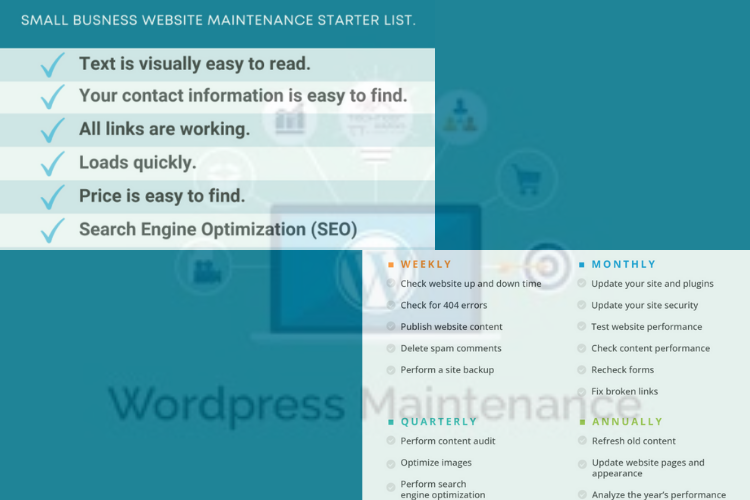
Yearly WordPress Maintenance Checklist
– Disavow Toxic Links: Identify and disavow
low-quality backlinks to maintain website credibility and search engine
rankings.
– Check Social Media Links: Ensure all social
media links are working correctly to maintain a strong online presence.
– Review Overall User Experience: Assess and
improve website user experience to boost conversions, SEO, and user engagement.
Frequently Asked Questions
– Why is WordPress maintenance important?:
Regular maintenance ensures your website remains secure, fast, and ranking high
in search engines.
– How often should I update my WordPress
website?: Update your WordPress core, plugins, and themes regularly to ensure
security and functionality.
– What happens if I don’t maintain my WordPress
website?: Failure to maintain your WordPress website can lead to security
breaches, data loss, and poor performance.
At
Clarifu, we understand the importance of regular WordPress maintenance. Our
team of experts provides comprehensive maintenance services, including:
– Daily Backups: We ensure your website is
backed up daily to prevent data loss.
– Security Scanning: Our team regularly scans
for vulnerabilities to identify potential security threats.
– Performance Optimization: We optimize your
website’s performance to improve speed and user experience.
– Uptime Monitoring: We monitor your website’s
uptime to ensure it’s accessible 24/7.
With
Clarifu, you can enjoy a secure, well-maintained WordPress website without
breaking the bank. Our customised maintenance plans are designed to provide you
with the best possible service at an affordable price.
By following this comprehensive WordPress maintenance checklist and partnering with Clarifu, you can ensure your website remains secure, stay up 24 X 7 , improve the SEO ranking, high-performing, and well-maintained.